Thinking about developing a hybrid mobile app using Cordova in 2026? Securing your Cordova applications is more critical than ever. Hackers are constantly refining their techniques, targeting vulnerabilities in web views, plugins, and data storage. The good news is that by following a set of proven best practices, you can significantly reduce security risks and protect your users’ data. Let’s walk through the essential steps to make your Cordova apps resilient against threats and compliant with modern security standards.
Building secure Cordova applications in 2026 requires a proactive approach that includes keeping tools updated, enforcing strict content policies, and implementing advanced security measures. Combining these practices ensures your hybrid apps are resilient against evolving threats and safeguard user data effectively.
Understanding the importance of security in Cordova apps
Cordova, as a popular framework for creating cross-platform hybrid apps, relies heavily on web technologies like HTML, CSS, and JavaScript. While this approach accelerates development and simplifies deployment, it also introduces unique security challenges. Web views can be vulnerable to injection attacks, and plugins may expose vulnerabilities if not carefully managed. As security threats grow more sophisticated in 2026, developers must adopt comprehensive measures to shield their applications from malicious exploits.
Core principles for securing Cordova applications
To effectively secure your Cordova apps, focus on these core principles:
- Keep all components updated
- Implement a robust Content Security Policy (CSP)
- Use encrypted storage for sensitive data
- Enforce secure communication channels
- Harden WebView configurations
- Validate all user input
- Manage third-party plugins carefully
Applying these fundamentals lays a strong foundation for security, reducing the attack surface and preventing common vulnerabilities.
Practical steps to enhance Cordova app security in 2026
- Keep your development environment current
Always update Cordova CLI, plugins, and dependencies regularly. New versions contain patches for known vulnerabilities and improvements for security. Ignoring updates can leave your app exposed to exploits that have already been addressed in newer releases. Visit the official Cordova documentation for the latest guidance on upgrades and migration.
- Implement a strict Content Security Policy
A well-crafted CSP restricts which sources can execute scripts, load resources, or connect to external servers. In 2026, CSP remains a critical line of defense against cross-site scripting (XSS) attacks. Use the “ tag or server headers to specify trusted domains and disallow inline scripts. For example:
This minimizes the risk of malicious code injection.
- Secure sensitive data storage
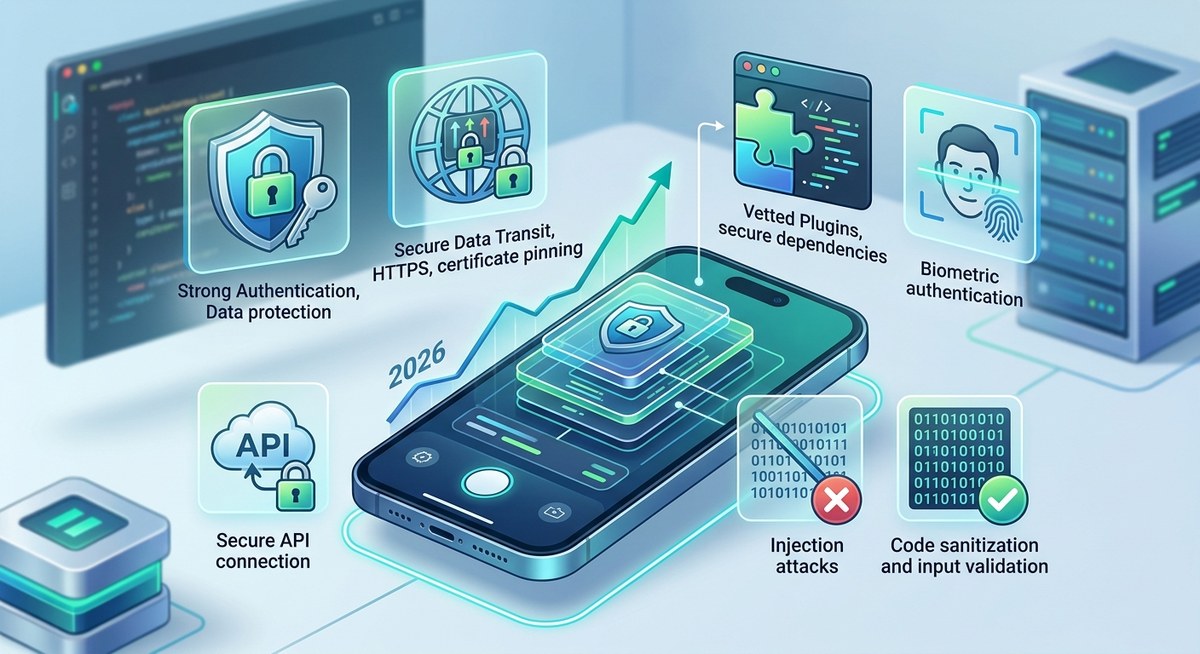
Storing user credentials, tokens, or personal data securely is vital. Use platform-specific encrypted storage solutions like Android’s Keystore or iOS Keychain via plugins such as cordova-plugin-secure-storage. Avoid storing sensitive data in plain text or localStorage which are vulnerable to theft.
- Enforce HTTPS and pin certificates
All data transmitted between your app and servers must be encrypted. Enforce HTTPS for all endpoints and implement certificate pinning to prevent man-in-the-middle attacks. Certificate pinning verifies the server’s identity, ensuring data is not intercepted or tampered with. Many plugins now support pinning, such as cordova-plugin-advanced-http.
- Harden WebView configurations
Configure WebView settings to disable features that can be exploited. Disable JavaScript if not needed, and prevent file access or remote debugging in production builds. Use the cordova-plugin-android-permissions to restrict permissions, and configure WebView in native code when necessary.
- Validate all user input
Never trust data from users. Rigorously validate and sanitize input on both client and server sides. Use libraries and frameworks that help prevent injection attacks. For example, escape user input before inserting into the DOM or database.
- Manage third-party plugins wisely
Plugins extend Cordova’s functionality but can also introduce vulnerabilities. Audit each plugin before integration. Prefer plugins maintained by active communities and regularly updated. Remove unused or deprecated plugins to reduce attack vectors.
Advanced security techniques for 2026
-
Obfuscate code: Use code minification and obfuscation tools to make reverse engineering harder. Tools like cordova-plugin-uglify can help.
-
Implement biometric authentication: Leverage device biometrics for authentication. Plugins like cordova-plugin-android-fingerprint-auth add an extra layer of security.
-
Conduct regular security testing: Use automated tools such as static application security testing (SAST), dynamic testing, and manual penetration testing to identify weaknesses early.
-
Set up security monitoring: Implement logging and real-time monitoring to detect suspicious activity post-deployment. Use analytics and alerts to respond swiftly.
“Proactive security measures in your Cordova apps are essential in 2026. Always assume that vulnerabilities will be discovered and be prepared to adapt swiftly.”
Common pitfalls to avoid in Cordova security
| Mistake | Explanation |
|---|---|
| Ignoring updates | Leaving frameworks and plugins outdated exposes known vulnerabilities. |
| Weak CSP | Failing to restrict resource sources allows malicious scripts to execute. |
| Storing secrets insecurely | Plain text storage or insecure channels risk data theft. |
| Overlooking plugin safety | Using unvetted or deprecated plugins can introduce exploits. |
| Neglecting input validation | Failing to sanitize user input enables injection attacks. |
Testing and maintaining security in your Cordova app
Security is an ongoing process. Regularly test your application with tools like OWASP Zap and conduct code reviews focusing on security. Establish a maintenance plan that includes monitoring for new vulnerabilities and applying patches promptly. Remember that security isn’t a one-time effort but a continuous commitment.
Final thoughts on securing Cordova applications in 2026
Building secure Cordova apps in 2026 demands a blend of current best practices and awareness of emerging threats. By keeping your tools current, enforcing strict policies, and routinely testing your app, you can protect your users and maintain trust. Security should be baked into every stage of development, from initial design to post-deployment updates. Apply these principles diligently to create resilient, trustworthy hybrid applications.
Protecting your hybrid app future
Taking proactive steps today ensures your Cordova applications remain secure tomorrow. Stay informed about new vulnerabilities, leverage advanced security plugins, and foster a security-first mindset within your developer team. With consistent effort, your apps can stand strong against the evolving landscape of mobile security threats.